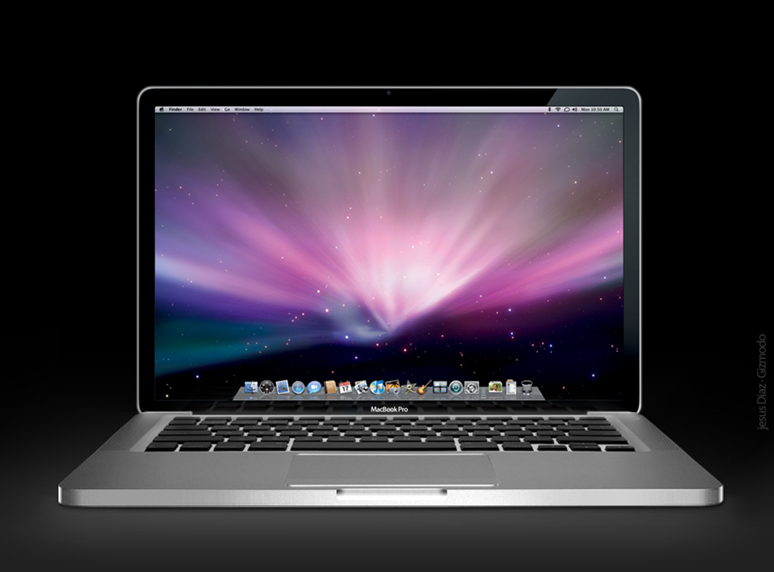
Get a Mac tribute

iSendr - On Demand P2P File Transfers
http://isendr.com
iSendr lets you send files to anyone with an internet connection via an on demand p2p direct connection for free! Your file goes straight from you to its destination-- no server space required.

Windows SteadyState Returns Your PC to Normal :: the How-To Geek
If you have a shared access computer, it can be aggravating when other users make a bunch of changes to the settings. Today we take a look at SteadyState for Windows Vista and XP which lets you return the computer to the original state after a user session.
Windows SteadyState
Not only does SteadyState return the PC back to its original state, but you can set it up to restrict what the user can access. You can lock down virtually every aspect of the computer from programs to websites and more. Of course you’ll need to be the administrator, and the first thing to do is install current drivers and Windows Updates. Then install programs and configure settings you want to how you want the machine to be every time it’s restored. Once everything is set up and you create different user account, you can let the public have at it. Any changes they make to the configuration will be undone just by restarting the machine. Here we take a look at SteadyState running on a Windows XP machine.

Outlook users, if you find yourself entering the same things into email messages, you should take a look at the Quick Parts feature, which saves snippets of both text and images for easy reuse.
Click Here for the instructions.

Full Story
Have you ever noticed that many of the hotfixes listed in the Microsoft Help and Support knowledge base aren't actually available for download unless you contact support? What you might not know is that there is a secret form on the MS site that allows you to fill out a request for that specific hotfix… it's just not easily accessible.
Click here for more info
Outlook doesn't support creating calendar items that countdown (or count up) to a specific date. You'll need to create each item individually and the easiest way to do this is outside of Outlook and import the file to the Calendar.
Full set of instructions
Per Microsoft, copy the following text into a text file and rename the extension “.cmd” and you’ll have yourself a cmd file that you can pass around:
***********************************
@echo off
REM RegisterAdminPak.cmd
REM (c) 2006 Microsoft Corporation. All rights reserved.
set filelist=adprop.dll azroles.dll azroleui.dll ccfg95.dll
set filelist=%filelist% certadm.dll certmmc.dll certpdef.dll certtmpl.dll
set filelist=%filelist% certxds.dll cladmwiz.dll clcfgsrv.dll clnetrex.dll
set filelist=%filelist% cluadmex.dll cluadmmc.dll cmproxy.dll cmroute.dll
set filelist=%filelist% cmutoa.dll cnet16.dll debugex.dll dfscore.dll
set filelist=%filelist% dfsgui.dll dhcpsnap.dll dnsmgr.dll domadmin.dll
set filelist=%filelist% dsadmin.dll dsuiwiz.dll imadmui.dll lrwizdll.dll
set filelist=%filelist% mprsnap.dll msclus.dll mstsmhst.dll mstsmmc.dll
set filelist=%filelist% nntpadm.dll nntpapi.dll nntpsnap.dll ntdsbsrv.dll
set filelist=%filelist% ntfrsapi.dll rasuser.dll rigpsnap.dll rsadmin.dll
set filelist=%filelist% rscommon.dll rsconn.dll rsengps.dll rsjob.dll
set filelist=%filelist% rsservps.dll rsshell.dll rssubps.dll rtrfiltr.dll
set filelist=%filelist% schmmgmt.dll tapisnap.dll tsuserex.dll vsstskex.dll
set filelist=%filelist% w95inf16.dll w95inf32.dll winsevnt.dll winsmon.dll
set filelist=%filelist% winsrpc.dll winssnap.dll ws03res.dll
for %%i in (%filelist%) do (
echo Registering %%i …
regsvr32 /s %%i
)
echo.
Echo Command Completed
*********************************
After writing yesterday's article about creating a shortcut to the Safely Remove Hardware dialog, a number of readers mentioned to me that they'd like create a shortcut to immediately eject a specific drive, so we'll cover that here.
Using the built-in Windows dialog is more powerful and probably would suffice for most people, but for those of us that want complete control there's a small freeware utility called USB Disk Ejector.
Note: This utility only works for ejecting USB devices, so if you need to eject another type of device you'll have to use the Windows method.
Using USB Disk Ejector from the GUI
This utility is really quite slick… launch it and then either double-click or press enter on the usb device you'd like to eject. There's literally nothing else to it.

If you assign a hotkey to the executable through a shortcut, you can operate the entire thing from your keyboard. Quite useful for keyboard ninjas!
Full Article
Speed Up Network File Copying While Playing Audio in Windows Vista SP1
Windows Vista restricts network traffic to 10 packets per millisecond while playing multimedia to prevent skipping. Unfortunately this causes network speed to be pitiful on a gigabit network, especially during file copies over the network.
Service Pack 1 includes a new registry tweak that can be used to change the throttling percentage so you can at least partially fix this problem, but you should be careful to test it out, because you don't want your audio to skip either.
Note: This setting is only really useful if you are on a gigabit network - the default values should be fine for a Wireless network.
Full Article
Dual Monitors: Use a Different Wallpaper on Each Desktop in Vista or XP
One of the most popular articles around here has been the article I wrote a year ago about using different wallpapers on each desktop using Active Desktop in Windows XP. The problem with that article is that it didn't work in Windows Vista… but now we have a great solution that is also free.
Instead of paying money for software to use separate wallpapers, or creating a wallpaper in Photoshop, Jon Tackabury has created a Free piece of software that lets you easily set separate wallpapers for each desktop.
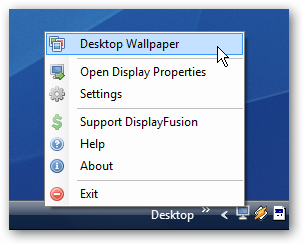
Once the software is installed, you'll notice a new tray icon. Clicking the Desktop Wallpaper item from the menu will open up the dialog where you can set the wallpaper.
You can click on each desktop in the display, and set display settings differently for each monitor, or span the wallpaper across the two.
Full Instructions
Whenever a new version of a service pack for XP is released I always run it through the slipstreaming procedure to see if everything works as expected. Service Pack 3 (SP3) is the latest release so it was time for another round of testing. For those of you that have a copy of SP3 and want to give it a try the procedure I used is presented below. I experienced absolutely no problems with the procedure based on an original Gold Edition XP Professional CD. The slipstreamed CD booted and installed perfectly to a freshly formatted hard drive.
http://www.theeldergeek.com/slipstreamed_xpsp3_cd.htm
vLite is a tool for customizing the Windows Vista installation before actually installing it.
Main features are:
Microsoft Definition: A collection of masters associated with a particular Microsoft Visio drawing type, or template. By default, stencils that open with a template are docked on the left side of the drawing window. You can open stencil (.vss) files independently of a template.
Basically, a Stencil contains Shapes that are used to create a diagram. The Shapes can range from simple flow chart boxes or lines to more complicated Shapes like Servers, Racks or anything else that needs to be represented in a graphical form.
Download them here http://www.visiocafe.com/index.htm
Answer: The easiest way to find out such additional account information is to install the acctinfo.dll that's part of Windows Server 2003 Resource Kit. When you install acctinfo.dll, it extends the functionality of custom Microsoft Management Consoles (MMCs) by adding a tab to the user account Properties in Active Directory Users and Computers (ADUC) console.
Use AcctInfo.DLL to reset passwords and find the last good logon for users on your Windows 2003 systems.
Question: How can I find out the last time that the user's password was set and the last good logon on our Windows 2003 domain?
http://mcpmag.com/columns/article.asp?EditorialsID=1050